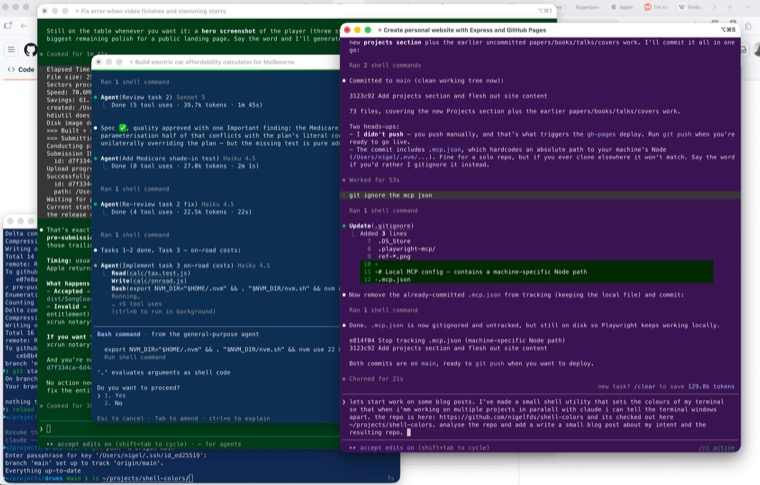
Lately I've been running several Claude Code sessions at once — one building a feature here, another chewing through a refactor there, a third deploying something. It's a good way to work, but it comes with a small, constant tax: I'd glance at a terminal and have no idea which project I was looking at. Every window was the same colour, so I'd read a few lines, realise I was in the wrong one, and go hunting for the right tab.
So I made a little thing to fix it.
The idea
Give every project its own terminal colour, automatically, and keep it stable — so "the blue window" is always the same project, "the green one" is always another, no matter how many tabs or windows I've opened. No config file to keep in sync, no picking colours by hand. Just a glance and I know where I am.
The result
shell-colors is a single zsh
script. Whenever I cd into anything under ~/projects/<name>/…, it tints the
iTerm2 window background based on <name> and leaves the text a light, faintly
tinted shade of the same hue. Step outside ~/projects and it resets to my
normal profile.
The colour isn't random — it's derived from the project name:
- The folder name is run through
cksumto get a stable number. - That number picks one of four families — blue, purple, maroon, or green — then nudges the hue a little so neighbouring projects don't collide.
- Background lightness lands somewhere around 14–21% (nice and dark), paired with a ~90% lightness foreground so it stays readable.
Because it's all a pure function of the name, every tab and every window for the
same project gets the identical colour — even across machines — with no shared
state to manage. It hooks into zsh's chpwd, so the colour just follows me
around as I move between directories.
There's a pc-preview command too, which prints a swatch for every folder under
~/projects in its actual colours, so I can eyeball the whole palette at once.
The screenshot above is a normal afternoon: four windows, four projects, four colours — and I can tell them apart without reading a single word.
Try it
It's a copy-one-file-and-source-it install. The
README has the details, plus the
knobs for changing the palette or pointing it at a different projects root. It
needs iTerm2 (it leans on iTerm's SetColors escape sequence) and zsh; there's
tmux passthrough baked in if you live inside tmux.
Small utility, disproportionately calming.